자바스크립트: 라이브러리 이용하여 길찾기 - EasyStar.js
자바스크립트: 라이브러리 이용하여 길찾기 - EasyStar.js
길찾기 알고리즘에는 여러가지가 있는데 A* (A Star)라는 알고리즘이 많이 사용된다고 합니다.
라이브러리중에 EasyStar.js (https://www.easystarjs.com/) 라는게 있는데 이걸로 길찾기 알고리즘을 직접 구현하지 않고도 사용할 수 있습니다.
코드 예제
1
2
3
4
5
6
7
8
9
10
11
12
13
14
15
16
17
18
19
20
21
22
23
24
25
26
27
28
29
30
31
32
33
34
35
36
37
38
39
40
41
42
43
44
45
46
47
48
49
50
51
52
53
54
55
56
57
58
59
60
61
62
63
64
65
66
67
68
69
70
71
72
73
74
75
76
77
78
79
80
81
82
83
84
85
86
87
88
89
90
91
92
93
94
95
96
97
98
99
100
101
102
103
104
105
window.onload = function() {

  var startPoint = {x:0, y:0}
  var endPoint = {x:4, y:0}

  // EasyStar.js 선언
  var es = new EasyStar.js();

  var map = [
    [0, 0, 0, 1, 0],
    [0, 0, 0, 1, 0],
    [0, 2, 2, 2, 0],
    [0, 0, 0, 1, 0],
    [0, 0, 0, 0, 0]
  ];

    var canvas = document.getElementById("canvas");
    if (canvas.getContext) {
      var ctx = canvas.getContext("2d");

      var img = new Image(); // Create new img element
      img.src = './img/sprite.png'; // Set source path

      // Draw slice
      // drawImage(image, sx, sy, sWidth, sHeight, dx, dy, dWidth, dHeight)


      var drawMap = function(){
        ctx.clearRect(0, 0, 300, 300)
        var dx = 0
        var dy = 0
        for(var i in map){
          for(var j in map[i]){
            if(map[i][j] == 1){
              // 돌
              ctx.drawImage(img, 50, 0, 50, 50, dx, dy, 50, 50);
              dx += 50
            } else if (map[i][j] == 2){
              // 물
              ctx.drawImage(img, 0, 50, 50, 50, dx, dy, 50, 50);
              dx += 50
            } else if (map[i][j] == 0){
              // 빈 공간
              ctx.drawImage(img, 50, 50, 50, 50, dx, dy, 50, 50);
              dx += 50
            }
          }dx = 0
          dy += 50
        }

        // 도착지
        ctx.fillStyle = "rgb(230,220,0)";
        ctx.fillRect (50 * endPoint.x , 50 * endPoint.y, 50, 50);

      }

      drawMap()


      $("#btnRun").on("click", function(){

        drawMap();

        // 사람
        ctx.drawImage(img, 0, 0, 50, 50, startPoint.x, startPoint.y, 50, 50);

        // 지도(배열) 지정
        es.setGrid(map)

        if($("#avoidWater").is(":checked")){
          es.setAcceptableTiles([0, 2]); // 건널 수 있는 타일 설정 (0: 풀, 2: 물)
        } else {
          es.setAcceptableTiles([0]);
        }

        // 길찾기 부분 작성
        // findPath(startX, startY, endX, endY, callback);
        es.findPath(startPoint.x, startPoint.y, endPoint.x, endPoint.y, function(path) {
          if (path === null) {
            console.log("Path was not found.");
          } else {
            console.log("Path was found. The first Point is " + path[0].x + " " + path[0].y);
            console.log(path)
            var ix = 0
            setInterval(function(){
              if(ix <= path.length - 1) {
                console.log(path[ix].x, path[ix].y)
                drawMap()
                // 사람
                ctx.drawImage(img, 0, 0, 50, 50, path[ix].x * 50, path[ix].y * 50, 50, 50);
                ix++
              }

            }, 500)

          }
        });
         // 길찾기 부분 실행(invoke)
         es.calculate()
      })

    }
  }
1
2
3
4
5
6
7
8
9
<body>

  <div>
    <canvas id="canvas" width="300" height="300"></canvas>
  </div>
  <input type="checkbox" id="avoidWater">물 건너기
  <button id="btnRun">길찾기</button>

</body>
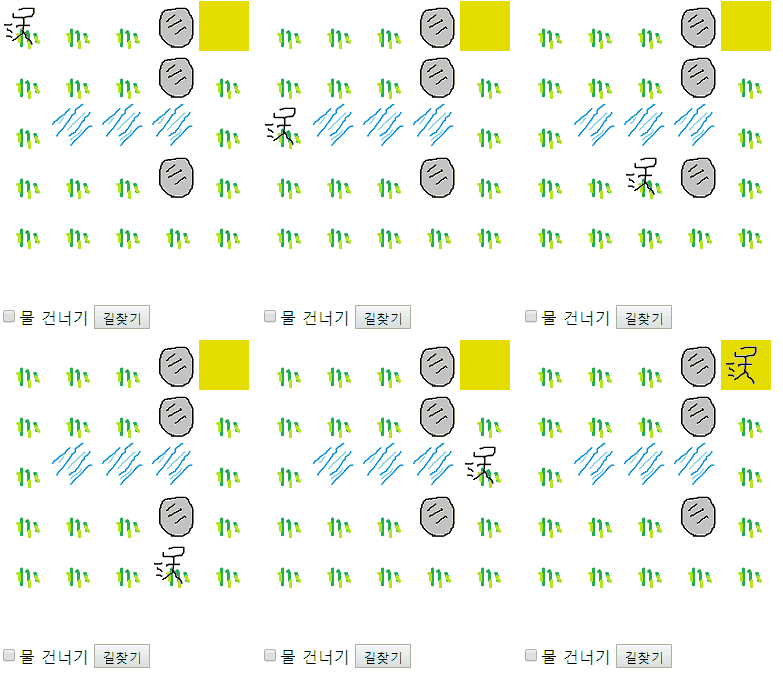
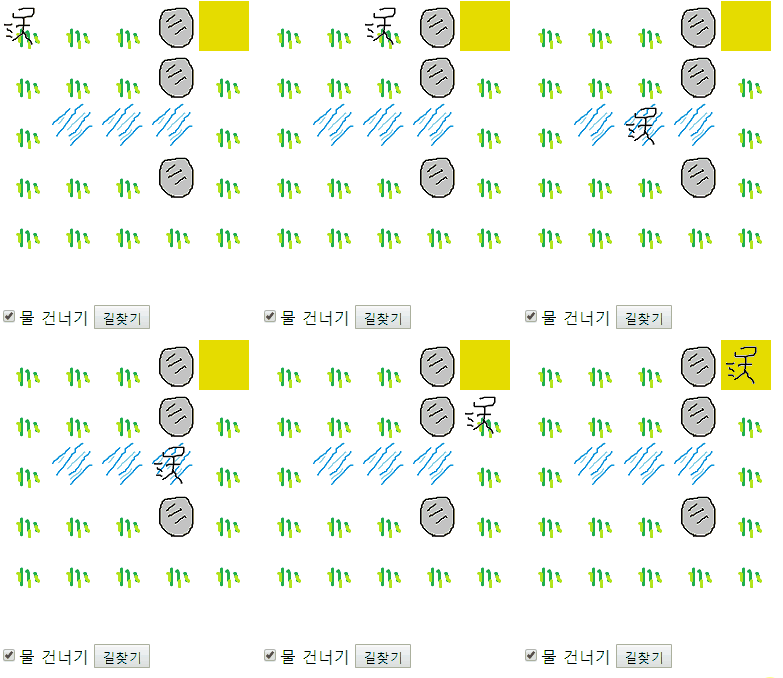
실행 화면
This post is licensed under
CC BY 4.0
by the author.