자바스크립트: Fetch (외부 라이브러리 없이 AJAX 사용)
자바스크립트: Fetch (외부 라이브러리 없이 AJAX 사용)
만약 JQuery 등의 외부 라이브러리 없이 AJAX를 사용하려고 한다면 예전에는(혹은 지금도) XMLHttpRequest(MDN 링크)라는 것을 사용해야 했습니다. 이것은 약간 사용하기 복잡했었는데요, ES6(2015)부터 fetch(MDN 링크)라는 기능이 도입되어서 약간 편하게 사용할 수 있게 되었습니다.
Promise를 기반으로 하기 때문에 지원하지 않는 웹 브라우저에서는 사용할 수 없습니다. 인터넷 익스플로러에서 사용 가능하게 하려면 Babel 등을 이용해서 변환해야 합니다.
관련 글
- 자바스크립트: AJAX로 blob 타입의 리스폰스 가져오기(파일 다운로드) - XMLHttpRequest 예제
- 자바스크립트: 콜백, Promise, async - await 기초 - Promise 예제
Promise
GET 예제
1
2
3
4
5
6
7
8
9
10
11
fetch("https://reqres.in/api/users?page=2", {
    method: "get"
}).then(resp => {
    const respJson = resp.json()
    console.log("resp", resp, respJson)
    return respJson // [[PromiseValue]]를 꺼내 다음 then으로 전송
}).then(data => {
    console.log("data", data)
}).catch(excResp => {
    console.log(excResp)
})
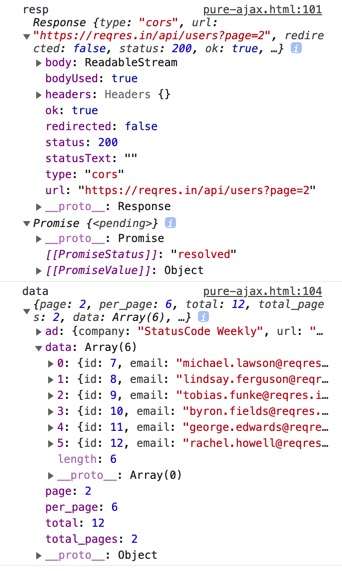
fetch의 첫번째 파라미터는 주소, 두번째 파라미터 각종 속성이 담긴 객체를 입력합니다. 다음 then과 resp.json()을 사용하면 JSON 형태로 결과를 불러올 수 있습니다. 다만 동작 방식상 ReadableStream으로 불러와 Promise로 묶여있는 상태이기 때문에 그것을 리턴시키고 한번 더 then을 사용해야 합니다.
POST 예제
1
2
3
4
5
6
7
8
9
10
11
12
13
14
15
16
17
18
const postTest = (name, job) => {
    fetch("https://reqres.in/api/users", {
        method: "post",
        // 헤더가 없으면 post가 안됨
        headers: {
            'Content-Type': 'application/json'
        },
        body: JSON.stringify({
            "name": name,
            "job": job
        })
    }).then(resp => {
        console.log(resp)
        return resp.json()
    }).then(data => {
        alert(JSON.stringify(data))
    })
}
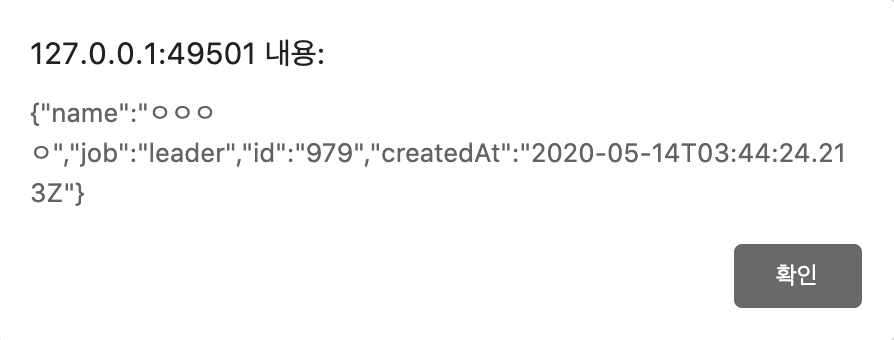
GET과 사용방법이 비슷합니다. 속성 객체의 body 부분에 서버로 전송할 객체를 입력하며 JSON.stringify로 스트링 변환한 뒤 보내는 것이 좋습니다. 참고로 header 부분을 설정하지 않으면 리퀘스트가 안될 수도 있습니다.
Async - Await 구문
위의 코드를 async - await (ECMAScript 2017에 등장)를 사용하면 보다 간결하게 작성할 수 있습니다.
GET 예제 (async - await)
1
2
3
4
5
6
7
8
9
10
11
12
(async function() {
    try {
        const init = await fetch("https://reqres.in/api/users?page=2", {
            method: "get"
        })
        const data = await init.json()
        console.log(data)
    } catch(exc) {
        console.warn(exc)
    }

})();
POST 예제 (async - await)
1
2
3
4
5
6
7
8
9
10
11
12
13
14
15
16
17
18
const postTest = async (name, job) => {
    const fetchObj = {
        method: "post",
        headers: {
            'Content-Type': 'application/json'
        },
        body: JSON.stringify({
            "name": name,
            "job": job
        })
    }

    // then을 하나의 const 변수에 대응
    const init = await fetch("https://reqres.in/api/users", fetchObj)
    const data = await init.json()
    alert(JSON.stringify(data))

}
This post is licensed under
CC BY 4.0
by the author.